
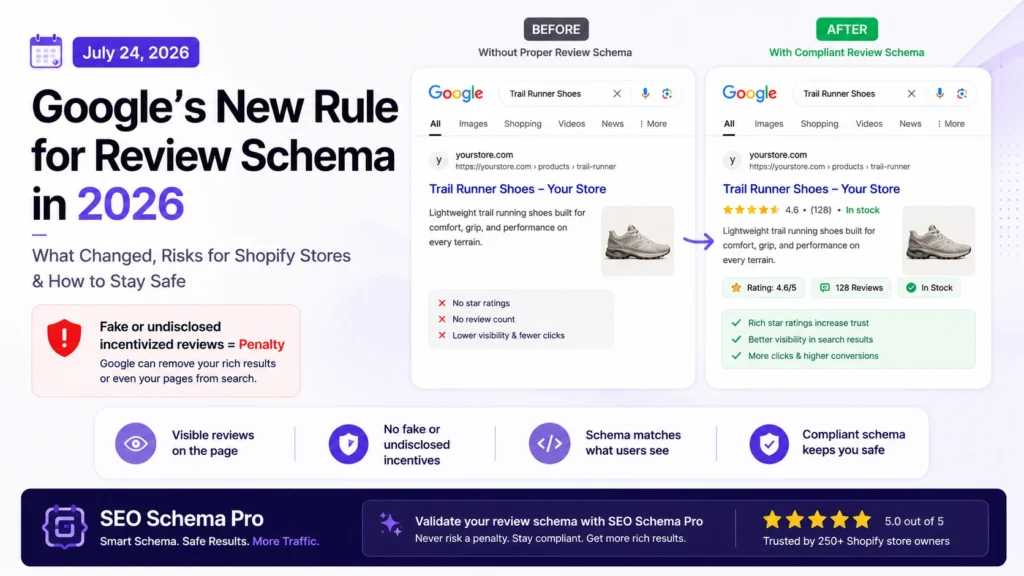
If you’re showing star ratings in Google search for your Shopify products, there’s a rule change you need to know about. On July 24, 2026, Google updated its official review snippet structured data documentation to explicitly ban fake and undisclosed incentivized reviews — both on the page and inside your JSON-LD markup.
This isn’t a minor wording tweak. Google can now issue a manual penalty that strips your rich results — or removes your pages from search results entirely — if your review schema doesn’t hold up. Here’s exactly what changed, why it matters for Shopify stores specifically, and how to add review schema the safe way.
What actually changed on July 24, 2026
Google added explicit language to its structured data guidelines stating that sites should not include fake or undisclosed incentivized reviews — either visibly on the page or inside AggregateRating / Review markup. Google calls out two specific violations:
- Reviews that aren’t based on a genuine product or service experience
- Reviews written in exchange for money, discounts, vouchers, free products, or similar benefits — when that incentive isn’t clearly and prominently disclosed
Note what’s not banned: incentivized reviews themselves are fine. What’s banned is hiding the incentive. If a customer got a discount for leaving a review and you don’t disclose that, both the visible review and the schema built from it are now a policy violation.
The penalty is real, and code-valid schema doesn’t protect you
Here’s the part that catches merchants off guard: your structured data can pass every validator check and still get penalized. Fake reviews, undisclosed incentives, and misleading ratings can be 100% syntactically valid JSON-LD — Google’s manual action targets the content, not the code.
If Google’s spam team finds a violation, the consequences stack:
- Your page loses eligibility for the star-rating rich result
- In more serious or repeated cases, Google can apply a manual action — pages drop out of the rich-results program, and in extreme cases can be removed from search entirely
- Google’s detection has gotten sharper following the FTC’s October 2024 rule banning fake reviews outright — Google now watches for sudden review bursts, near-identical review text, and suspicious authoring patterns, then strips rich results from flagged sites
Three Shopify-specific mistakes that trigger this
1. Claiming a rating with no visible reviews on the page. If your AggregateRating schema says 4.8 stars but a shopper can’t actually see any reviews when they land on the product page, that’s a direct content-mismatch — one of the most common manual-action triggers Google flags. Only add AggregateRating when your review app is actually displaying real customer reviews on that page.
2. Self-collected or imported reviews with no disclosure. If you’re bulk-importing reviews from a supplier feed, a previous store, or an incentivized collection campaign, you need to be able to show those reviews reflect a genuine experience — and disclose incentives where they apply. “The reviews are real” isn’t the bar anymore; “the reviews are real and properly disclosed” is.
3. Shopify doesn’t add this by default. Unlike price and availability, Shopify does not output AggregateRating schema out of the box — no theme, no matter how recent, generates it automatically. It only appears if a review app (or your own metafield setup) is actively populating it and the underlying reviews are visible on the page.
How to add review schema the safe way
- Only mark up reviews that are genuinely collected from verified customers
- Never populate
AggregateRatingunless the individual reviews are visibly rendered on that same page - If any reviews were incentivized (discount, free product, etc.), disclose that incentive clearly on the page — don’t just quietly include the review
- Match your schema to what’s on the page exactly — same rating, same review count, same content. Content parity is enforced strictly; when structured data contradicts the visible page, Google can just ignore the markup, or worse, flag it
- Re-check your schema whenever you switch review apps or bulk-import reviews — old markup can silently drift out of sync with what’s actually on the page
A minimal, compliant example looks like this:
{
“@context”: “https://schema.org”,
“@type”: “Product”,
“name”: “Trail Runner”,
“aggregateRating”: {
“@type”: “AggregateRating”,
“ratingValue”: “4.6”,
“reviewCount”: “128”
},
“review”: [
{
“@type”: “Review”,
“author”: { “@type”: “Person”, “name”: “Priya S.” },
“reviewRating”: { “@type”: “Rating”, “ratingValue”: “5” },
“reviewBody”: “Comfortable straight out of the box, held up on a 20km trail run.”
}
]
}
Every field here should map to something a real shopper can see on the live page — the rating, the count, and the review text itself.
Where SEO Schema Pro fits in
This is exactly the kind of mistake ‘s built-in validator is designed to catch before it becomes a penalty risk. The app deliberately never fabricates ratings, reviews, or review counts — if you haven’t connected real review data, it simply leaves aggregateRating out rather than guessing, so you’re never shipping schema your page can’t back up.
If you’re pasting in your own custom review schema (say, from a developer or another tool), run it through the app’s first — it checks the same Rich Results requirements Google enforces, so you catch a mismatch before Google’s crawler does.
FAQ
Does this affect stores that don’t use review schema at all?
No — if you’re not marking up AggregateRating or Review at all, none of this applies to you. The risk is specifically for stores already showing star ratings in search.
Can I still use incentivized reviews?
Yes. Google’s rule targets undisclosed incentives, not incentives themselves. Disclose the incentive clearly on the page and you’re compliant.
How do I know if I’m already affected?
Check Google Search Console → Performance → Search appearance, filtered by “Rich result.” If your rich results have quietly disappeared, cross-check your AggregateRating against what’s actually visible on the page.
Read next
- Product Schema Markup for Shopify: The Complete Guide
